

Fixing the 409 (Conflict) on Add to Cart in Shopify
You might be seeing Javascript errors on your developer console when Adding or Updating items in your cart. For example on the network tab you see:
POST https://your_shop.myshopify.com/cart/change.js 409 (Conflict)
When you view the underlying error it says:
Error updating item 54412059967779:bff40196fb41b4183b6b7b33d5536594: Error: Failed to update item 54412059967779:bff40196fb41b4183b6b7b33d5536594 at cart
You’re seeing that 409 (Conflict) because something else is changing the cart at the same time (or in a conflicting way) as your cart/change.js call when you click the checkout button.
What 409 Conflict usually means for /cart/change.js
On Shopify storefronts, POST /cart/change.js is part of the Cart AJAX API. A 409 here almost always means:
“The cart changed in a way that conflicts with what this request expects.”
Common concrete causes:

Two cart updates at once
The code above which loops over items and calls
/cart/change.jsfor each one.At the same time:
Another script (an app, extension, or theme code) also hits
/cart/change.jsor/cart/add.js, orThe user triggers some other cart action (e.g., quantity selector with auto-save).
Shopify detects overlapping updates and returns
409.
Cart item no longer matches the request
The line item identifier
54412059967779:bff40196fb41b4183b6b7b33d5536594may no longer exist in the cart by the time your request runs:It has been removed or merged (e.g., same variant and properties get combined).
Some app/extension manipulated that item (changed properties, attributes, selling plan) so your payload is no longer valid.
Extension / custom attribute mismatch
In your project, it’s very likely you’re:
Adding cart line attributes / properties (e.g.
_SAPNumber,_HubspotCustomerID, etc.).Then your checkout button calls a function that re-writes all cart lines with updated attributes.
If any of those attributes fail validation or cause Shopify to treat the line as a different item, the original key may not be valid anymore at the time of the update call, causing conflicts.
Race condition inside your code

If your code does something like the above, then you’re hammering the cart with many concurrent mutations.
Shopify’s cart backend is not designed for many simultaneous mutations – that alone can cause 409s.
What you can do about it
1. Serialize cart updates instead of running them in parallel

If you’re using Promise.all, change it to run updates sequentially:
This removes a lot of race conditions with the Shopify cart.
2. Minimize how often you call /cart/change.js
Instead of calling it once per line item:
Build a single request when possible, or
Only update lines that actually changed.
For example:
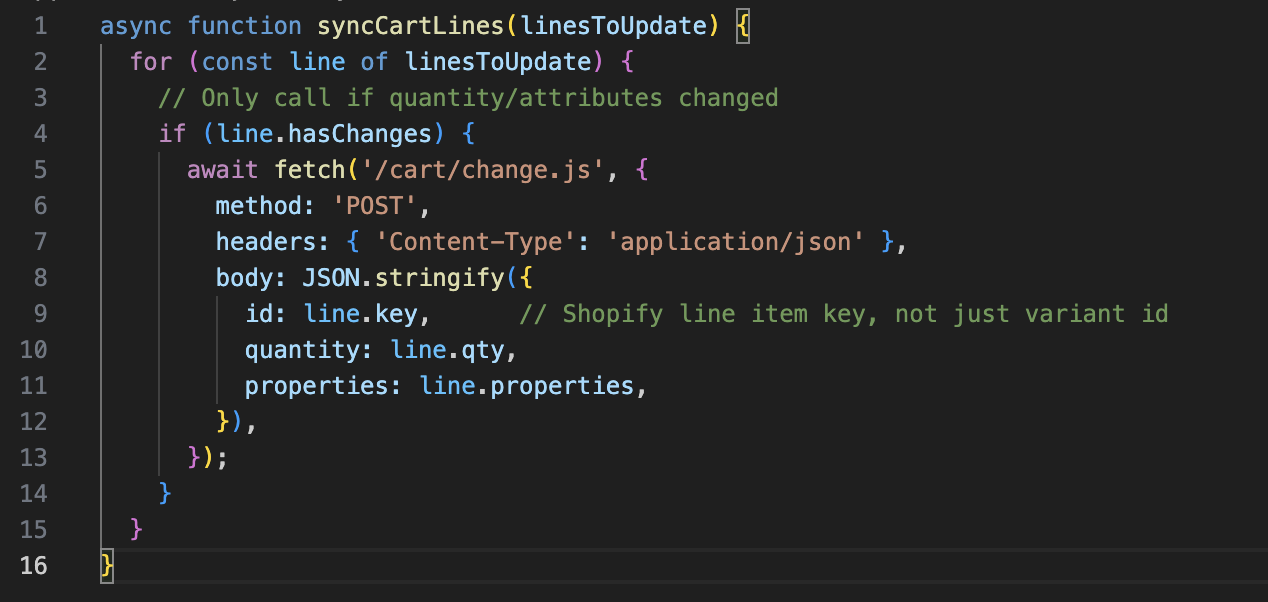
3. Make sure you’re using the line item key, not just the variant ID
Shopify’s /cart/change.js can use:
id: the line item key (not variant ID), orline: the line number (1-based index in the cart).
If you’re sending a variant ID as id, but the cart already has multiple lines of that variant with different properties, you can get conflicts. Make sure you’re using Shopify’s actual line key from /cart.js responses rather than your own composite key.
4. Check for other scripts touching the cart on checkout click
Search your theme / apps for:
onSubmithandlers on the same checkout form.Other calls to:
/cart/change.js/cart/update.js/cart/add.js
If multiple scripts run on the checkout button, they can collide:
One script: normal “go to checkout” flow.
Another script: tries to “normalize” cart lines, set attributes, etc.
Try to:
Centralize cart mutation into one function.
Ensure your extension’s update logic runs before redirecting, and nothing else mutates the cart in that same moment.
5. Add logging around the failing request
Log the payload of the failing call:
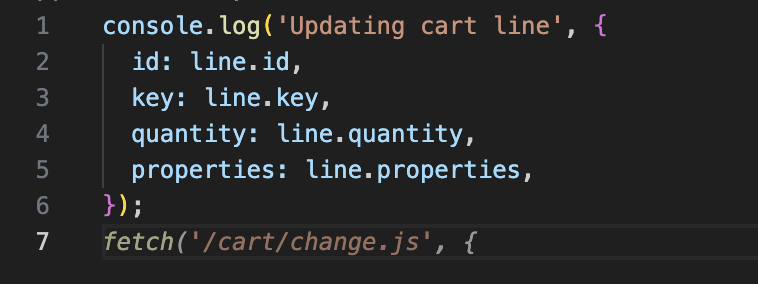
Then, right before that call, also log the current /cart.js response:

Hope this helps!
